
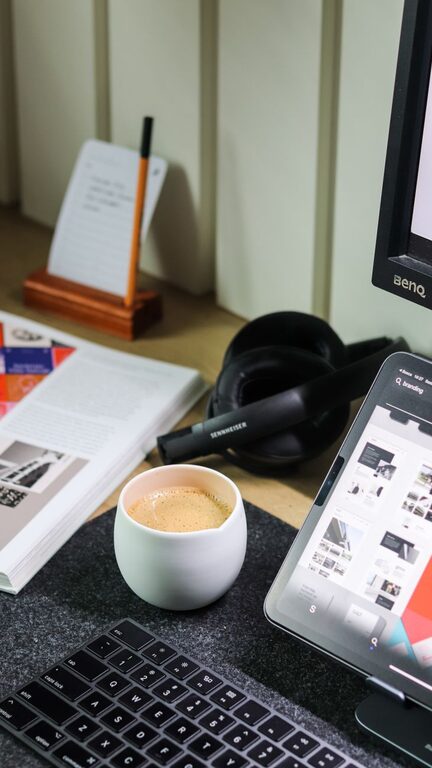
Reading articles, browsing the web, and scrolling through digital documents are part of everyday life. However, long sessions on a phone, tablet, or computer can become uncomfortable when your device is difficult to hold, your screen is poorly positioned, or your workspace feels cluttered.
The right tech accessories can make a noticeable difference. They do not need to be expensive or complicated. A few practical additions can help you view content more comfortably, keep your hands relaxed, and create a better setup for both short visits and longer reading sessions.
1. Adjustable Device Stands
An adjustable stand is one of the simplest ways to improve your browsing setup. Instead of holding a tablet or placing it flat on a desk, you can raise the screen to a more comfortable viewing height and angle.
Device stands are useful for:
- Reading digital books, articles, and recipes
- Watching tutorials or videos while working
- Keeping a tablet visible during video calls
- Using a phone as a secondary screen
Look for a stand with a stable base, a non-slip surface, and adjustable viewing angles. A foldable model is convenient if you often move between rooms or travel. For tablets, choose a stand that supports your device’s size and weight without wobbling.
2. Tablet and E-Reader Cases with Built-In Stands
A protective case with a built-in stand combines two useful features in one accessory. It protects your device from scratches and minor bumps while allowing hands-free reading.
Many cases offer several folding positions. One angle may be suitable for reading at a desk, while another works better on a table or lap. Some cases also include a cover that helps protect the screen when the device is not in use.
When choosing a case, check that it does not block buttons, speakers, charging ports, or cameras. A case that is too bulky can make a lightweight tablet feel less comfortable, so consider how you normally hold and use the device.
3. Blue Light and Glare-Reducing Screen Protectors
Bright reflections can make digital reading more tiring, especially in rooms with windows or overhead lighting. A matte screen protector helps reduce glare by softening reflections on the display.
Some screen protectors are also designed to reduce the appearance of blue light. Features vary between products, so check the manufacturer’s information before buying. A protector should preserve touch sensitivity and maintain clear text without making the screen look hazy.
For the best results, combine a screen protector with sensible screen settings. Lowering brightness, using a warmer display mode in the evening, and avoiding direct light behind you can all make the screen easier to view.
4. Ergonomic Wireless Keyboards
If browsing includes writing comments, emails, notes, or documents, a separate keyboard can make the experience more comfortable. Laptop and tablet keyboards are convenient, but their fixed positions may not suit every workspace.
A wireless keyboard lets you place the screen at a comfortable height while keeping your hands in a more natural position. Compact keyboards are easy to carry and work well with tablets. Full-size models may be better for frequent typing because they usually include a dedicated number pad and larger spacing.
Features to Consider
- Quiet keys for shared spaces
- Bluetooth connectivity for a cable-free desk
- Rechargeable or long-lasting battery
- Comfortable key spacing
- Compatibility with your computer, tablet, or phone
Some keyboards can switch between multiple devices. This is helpful if you regularly move between a computer and a tablet without wanting to reconnect each time.
5. Vertical and Ergonomic Mice
Touchpads are useful for quick tasks, but extended browsing can feel easier with a separate mouse. An ergonomic mouse gives your hand a larger surface to rest on and can make navigation more controlled.
Vertical mice are designed to keep the hand in a more upright position. Other ergonomic models have a wider shape, thumb support, or textured sides. The best choice depends on your hand size, grip, and personal preference.
Wireless mice reduce cable clutter, while wired models do not require batteries or charging. If you choose a wireless option, consider one with a reliable connection and a battery indicator.
6. Lap Desks and Portable Work Surfaces
A lap desk provides a stable surface for a laptop, tablet, or compact keyboard when you are sitting on a sofa, in bed, or in another relaxed location. Many models include a cushion base, a device slot, or a built-in wrist rest.
Although a lap desk does not replace a properly arranged desk for every task, it can make casual reading and browsing more comfortable. Choose a model that is wide enough for your device and does not become hot during use. A lightweight design is easier to move, while a firm surface provides better support for typing.
7. Comfortable Headphones or Speakers
Audio can improve browsing when you are watching tutorials, listening to podcasts, or using text-to-speech features. Comfortable headphones can also help you focus in a noisy environment.
Over-ear headphones often provide soft padding and are suitable for longer listening sessions. On-ear models are usually lighter and more compact. Wireless earbuds are convenient for short sessions, but their fit can vary from person to person.
If you prefer not to wear headphones, small desktop speakers can provide clear sound without adding pressure around your ears. Choose speakers with simple volume controls and a size that fits your workspace.
8. USB Hubs and Cable Organizers
A clean workspace can make it easier to focus. Modern laptops and tablets often have limited ports, so a USB hub can provide connections for a keyboard, mouse, storage drive, or other accessories.
When shopping for a hub, check which ports you need. Common options include USB-A, USB-C, memory card slots, and display connections. Make sure the hub supports your device and offers enough power for connected accessories.
Cable clips, sleeves, and small cable boxes are also useful. They keep charging cables from sliding off the desk and reduce tangles around your reading area. Simple cable management can make a small workspace feel more organized.
9. Adjustable Desk Lamps
Good lighting is just as important as the accessories connected to your device. A desk lamp with an adjustable arm lets you direct light where it is needed without shining directly into the screen.
Look for a lamp with brightness settings and adjustable color temperature. A warmer setting may feel pleasant in the evening, while a neutral setting can work well during daytime tasks. Avoid placing the lamp where it creates a bright reflection on the display.
How to Build a Comfortable Setup
You do not need to buy every accessory at once. Start with the item that solves your biggest problem. If your neck feels uncomfortable, try a stand. If typing is the main issue, add a separate keyboard. If reflections make reading difficult, consider a matte screen protector or better lighting.
Keep the screen at a comfortable height and distance, support your arms when possible, and take regular breaks to change position. Accessories are most useful when they support good habits rather than encouraging long periods of sitting in one position.
With a few thoughtful additions, everyday reading and browsing can become more comfortable, organized, and enjoyable. The best setup is the one that matches your devices, your space, and the way you use technology each day.